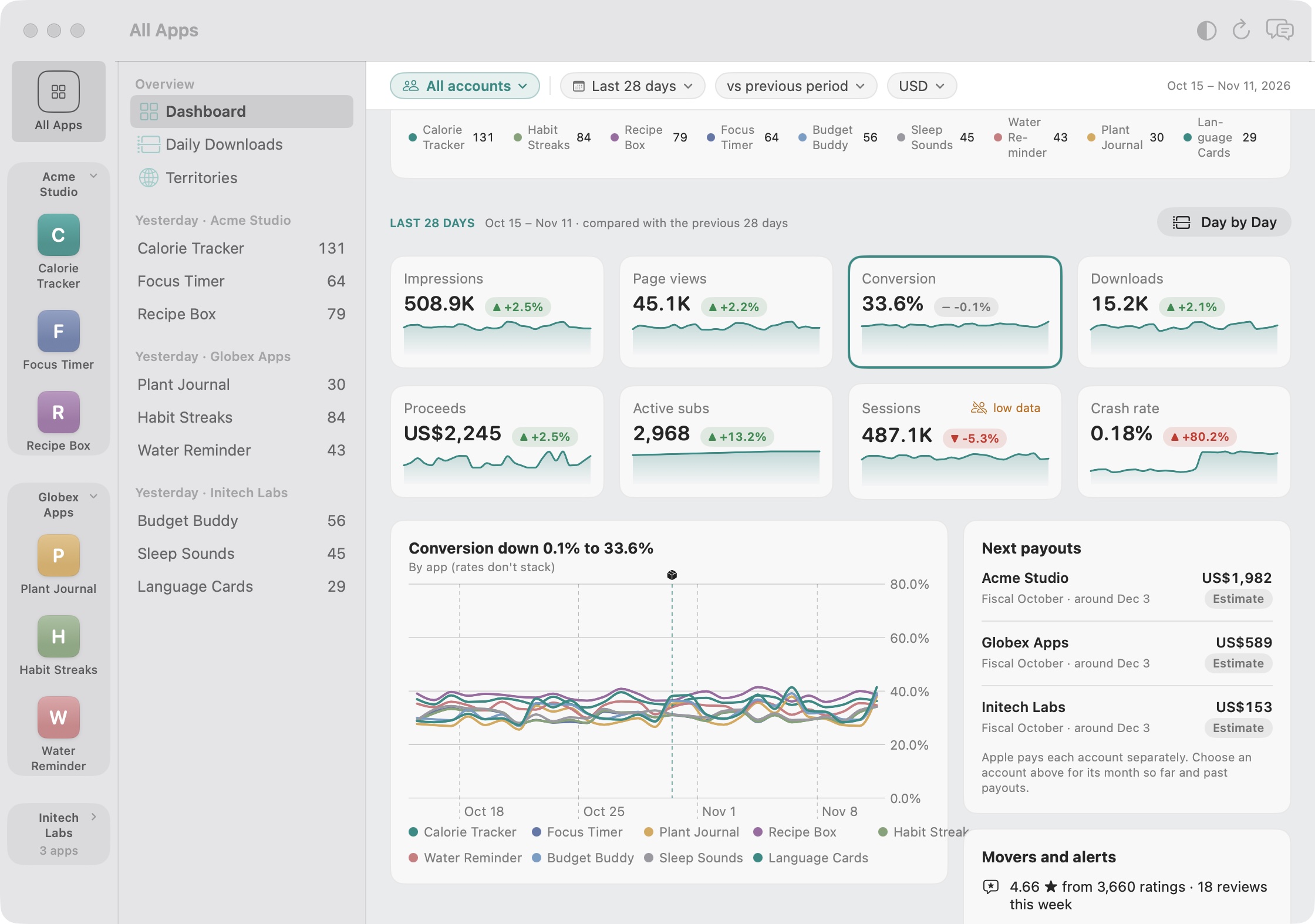
Add an App Store Connect account for every client or company you work with. Storewatch groups their apps, shows one account at a time when you need it, and keeps each account’s money separate.
3 days freeOne-time purchasemacOS 15 or later on Apple silicon
Ask about one client or all of them.
The AI sees every account you add, so you can compare clients or zoom in on one.
Which client’s apps grew the most this month?
Summarize last week for Acme Studio
Which accounts have apps that crash more after the last release?
Grouped by accountEach account’s apps sit together in the app list, under the name you give it. Or make your own groups across accounts.
One account at a timeAn account menu on the dashboard, Daily Downloads and Territories shows just that client’s numbers.
Unlimited accountsAdd as many as you manage. One license covers them all.
See one client at a time.
Pick an account and the dashboard, yesterday’s numbers, top countries and charts show only its apps. Pick “All accounts” to see everything together again.
The choice is remembered between pages and launches
Daily Downloads and Territories follow it too
Each app keeps its own screens, as before
Group apps your way.
Make groups like Games, In progress or one client’s apps, with apps from any of your accounts. Drag apps between groups in the app list, and pick a group in the Show menu to see just its numbers.
One group can mix apps from different accounts
Arrange the app list by group or by account
Hide apps you don’t track in Settings → Apps, and bring them back any time
Each account’s payout, on its own.
Apple pays every developer account separately, often to different companies. Storewatch shows each account’s next payout, its fiscal month and when it should arrive, instead of one misleading total.
Final amounts from Apple’s finance reports, or estimates until they arrive
Pick an account for its month so far and past payouts
A note when a key can’t read finance reports
Add a client in a minute.
Each account uses its own App Store Connect API key, created by the client’s Account Holder or an Admin. Give it a name, add the vendor number, and its apps appear.
Keys stay in your Mac’s Keychain
Rename an account any time, e.g. after the client
Remove an account and its data in one step
Questions, answered.
Does each account need its own API key?
Yes. App Store Connect keys belong to one developer account, so you add a key for each client or company. An Admin key is best: only Admin keys can turn on Apple's analytics reports and edit listings.
Is there a limit on accounts or apps?
No. One license covers every account and app you add.
Can the AI see every account?
Yes, Chat and the MCP server see every account you've added, so you can compare clients. Choose which AI to use, or none, in Settings → AI.
Can one group hold apps from different accounts?
Yes. Groups are yours, not Apple's: put any app in any group, whichever account it comes from. Pick the group in the Show menu and the dashboard, Daily Downloads and Territories add those apps up. Payouts still come per account, because that's how Apple pays.
How do I hide apps I don't track?
Open Settings → Apps and turn the app off. It leaves the app list, totals and charts and stops syncing, but its data stays on your Mac and nothing changes in App Store Connect. Turn it back on any time.
Does a client see my other clients?
No. Storewatch runs on your Mac and nothing is shared with anyone. Each client only gives you a key for their own account.