Storewatch AI agent

Your AI, with all your
App Store data.

Storewatch gives the AI you already use the numbers, listings, reviews, keywords and prices of every app you ship. Ask it anything, or ask it to change something. Every change is a draft until you publish.

Works with Claude, ChatGPT, Gemini, Claude Code, Codex and local models

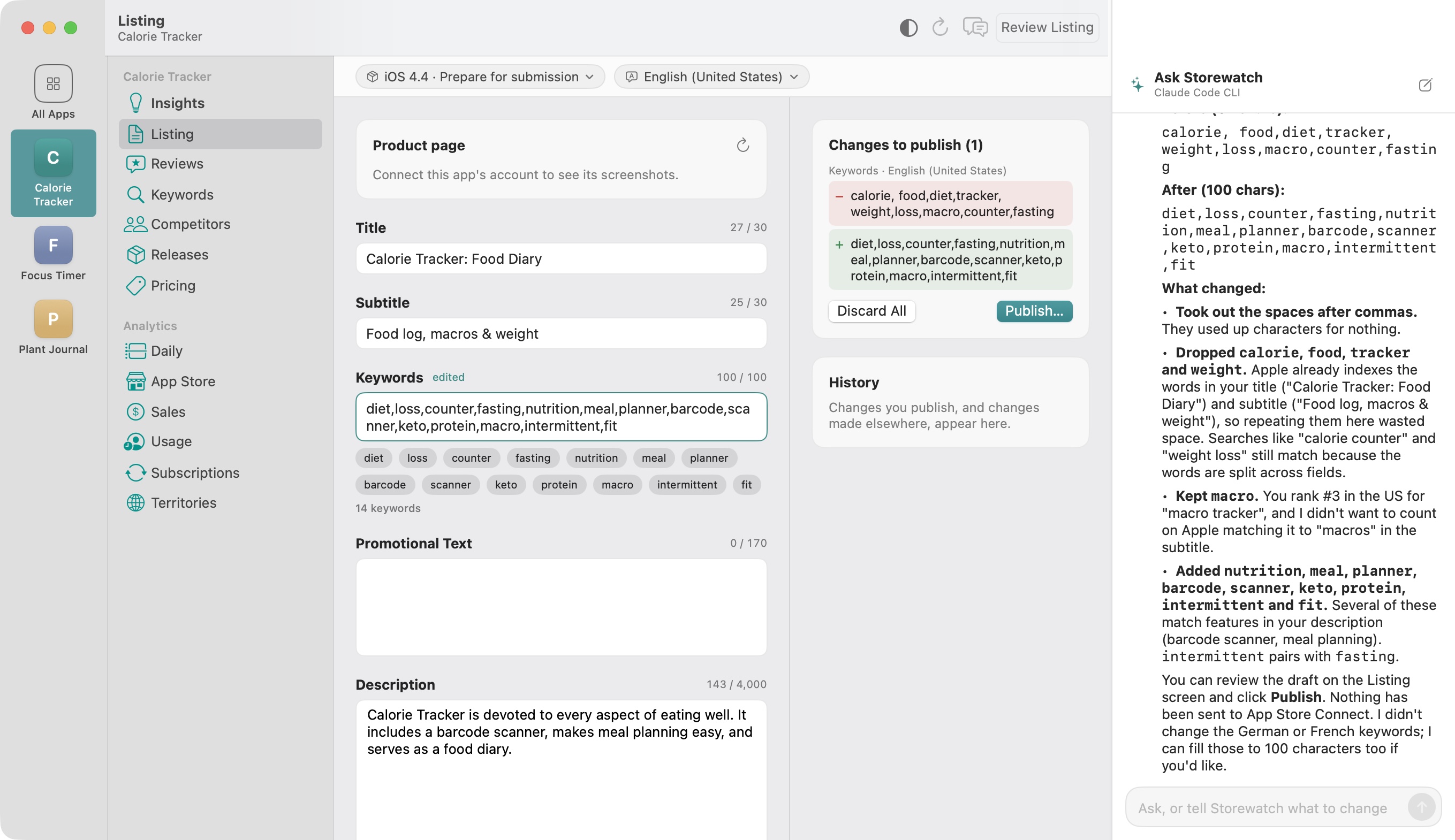
The Listing editor with the Ask Storewatch chat panel: the AI has rewritten the keywords to use all 100 characters, explained what changed, and left the draft under Changes to publish.

Three jobs it does for you.

Ask the way you'd ask a teammate who knows every number. Here are a few things people ask.

Change listings

Titles, subtitles, keywords, descriptions and what's new, in every language, plus the keywords you track.

  • Use all 100 characters of the English keywords
  • Translate the whole listing into Spanish, German and Japanese
  • Suggest 10 new keywords and start tracking them
Find issues

Crashes after a release, listing problems, prices that drifted and countries you're not on sale in.

  • Why does 4.3 crash more than 4.2?
  • What's wrong with my German listing?
  • Match Apple's price for Pro Yearly in India and Brazil

Ask for insights

Downloads, conversion, proceeds, subscriptions and reviews for one app or all of them, over any period.

  • Why did conversion drop last week?
  • Which of my apps grew fastest this month?
  • What are people complaining about in reviews?

It drafts. You publish.

The AI reads your data through read-only tools. Anything it wants to change comes back as a draft that shows exactly what will change.

What it can changeWhen it reaches Apple
Listing text in every language: title, subtitle, keywords, description, what's newWhen you publish, from the chat or the Listing screen
Prices of your app, in-app purchases and subscriptions, per countryWhen you apply them on the Pricing screen
Replies to reviews, in the reviewer's languageWhen you click Send
Keywords you track, events on your charts, insights you've dealt withNever: these stay in Storewatch on your Mac

Pick the AI you already use.

Use one for everything, or a different one for each job: chat, review replies, translations, listing checks and written reports. You can even compare two side by side.

Claude

Anthropic's models with your own API key. Pay per use.

ChatGPT

OpenAI's models with your own API key, separate from a ChatGPT Plus subscription.

Gemini

Google's models with a key from Google AI Studio.

Claude Code

Uses the claude command on your Mac and your Claude subscription. No key needed.

Codex

Uses the codex command on your Mac, signed in with your ChatGPT account.

OpenRouter

One key for many models from different companies.

Ollama

Open models running on your Mac. Nothing leaves it.

Apple on-device model

Free, private and offline. Needs macOS 26 with Apple Intelligence.

No AI at all

Everything else in Storewatch works without it.

Your data goes where you send it.

Storewatch has no servers that see your App Store data. What the AI sees depends on the AI you pick.

Cloud, with your key

Claude, ChatGPT, Gemini and OpenRouter get your question and only the data needed to answer it, straight from your Mac, under your agreement with them.

Your own tools

Claude Code and Codex run on your Mac and talk to their provider under your own account with them.

Fully on your Mac

Ollama and Apple's on-device model run locally. Nothing is sent anywhere.

API keys are kept in your Mac's Keychain. Details are in the Privacy Policy.

Already live in another AI app?

Ask the Claude app, Claude Code, Codex or Cursor about your apps without opening Storewatch. Connecting takes one click, or one pasted prompt.

  • Claude app: click Add to Claude in Settings → AI, then reopen Claude
  • Claude Code and Codex: paste the prompt Storewatch copies, and they connect themselves
  • Cursor and others: a one-click install link, or the standard config to paste
  • You choose the access: Off, Read only, or Full access, which can also draft listing text, prices and keywords. Drafts still wait for you to publish

Questions, answered.

Does the AI cost extra?

Storewatch doesn't charge for AI. You pay your provider for what you use with your own API key, use a subscription you already have through Claude Code or Codex, or run a model on your Mac for free with Ollama or Apple's on-device model.

Can the AI change my app without me?

No. It reads your data through read-only tools. Listing text, prices and review replies arrive as drafts that show exactly what will change, and nothing reaches the App Store until you publish, apply or send it.

Which AI should I pick?

The one you already use. Claude, ChatGPT, Gemini, OpenRouter and Ollama look things up in your data as they go. Claude Code and Codex use the subscription you're signed in with and get a summary of your data with each question. Apple's on-device model is free and private and needs macOS 26 with Apple Intelligence. You can pick a different AI for each job.

Do I need AI to use Storewatch?

No. Insights, analytics, reviews, keyword ranks, releases and prices all work without it. AI adds chat, drafts and written reports.

Put your AI to work today.

3 days freemacOS 15 or later on Apple silicon